

How Does an M.2 SATA SSD Improve Storage Performance and Device Compatibility?
2026-08-25
Article Summary: Choosing the right solid-state drive is not simply a matter of selecting the largest capacity or highest advertised speed. For laptops, mini PCs, office computers, embedded systems, and older devices, an M.2 SATA SSD can provide a practical balance between compact design, dependable performance, compatibility, power efficiency, and cost. Unlike an M.2 NVMe SSD, an M.2 SATA SSD communicates through the SATA protocol while using the compact M.2 form factor. This combination makes it particularly useful when a device supports M.2 SATA but does not provide PCIe/NVMe functionality.
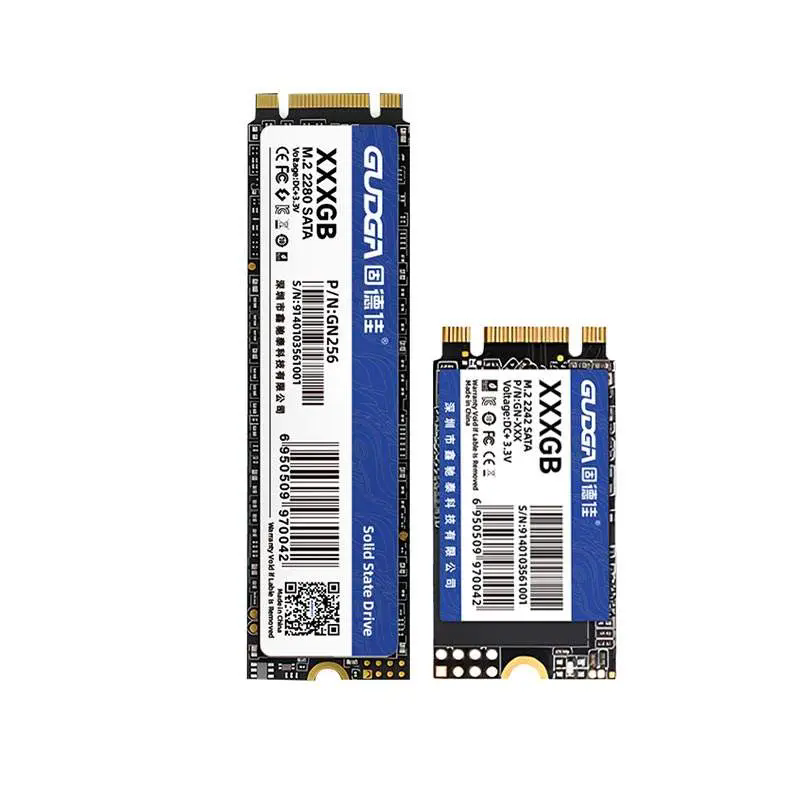
This guide explains how an M.2 SATA SSD works, what specifications matter during purchasing, how to avoid compatibility problems, and how to select the appropriate capacity and form factor for different applications. It also explains how GUDGA approaches M.2 SATA SSD solutions for consumer, commercial, and bulk procurement requirements.
Table of Contents
- Understanding the M.2 SATA SSD
- How the M.2 SATA SSD Architecture Works
- Key Advantages of an M.2 SATA SSD
- How to Check Compatibility Before Purchase
- Which Specifications Matter Most?
- M.2 SATA SSD vs. M.2 NVMe SSD
- Where an M.2 SATA SSD Is Most Useful
- How to Select the Right Capacity
- What Should Bulk Buyers Consider?
- Why Consider GUDGA M.2 SATA SSD Solutions?
- Frequently Asked Questions
- Conclusion
1. Understanding the M.2 SATA SSD
An M.2 SATA SSD is a solid-state storage device that combines the compact M.2 physical form factor with the SATA storage protocol. It is designed to replace conventional storage devices in systems where space is limited and a compatible M.2 SATA interface is available.
The important distinction is that M.2 describes the physical form factor and connector arrangement, while SATA describes the communication interface. This is why two drives may both look like M.2 modules while operating through completely different protocols.
For many users, this distinction is the source of compatibility problems. Installing an M.2 NVMe drive into an M.2 slot does not automatically mean that the system can operate the drive. The motherboard or host device must support the appropriate protocol.
An M.2 SATA SSD is therefore particularly attractive for equipment that already supports SATA-based M.2 storage. It can provide a substantial improvement over mechanical hard drives while maintaining a familiar storage interface and relatively straightforward system integration.
2. How the M.2 SATA SSD Architecture Works
The operation of an M.2 SATA SSD can be understood by looking at several components working together: NAND flash memory, a controller, firmware, the SATA interface, and supporting power-management functions.
- NAND Flash: Stores digital data without requiring continuous electrical power.
- SSD Controller: Manages data transfers, flash memory operations, error handling, and internal organization.
- Firmware: Controls how the SSD manages storage resources and responds to host commands.
- SATA Interface: Provides communication between the SSD and the host system.
- Power Management: Helps control energy consumption during active operation and idle periods.
- ECC and Data Management: Helps detect and correct certain forms of data errors and maintain storage reliability.
When the operating system requests information, the controller locates the relevant data in NAND flash and transfers it through the SATA interface. Because there are no mechanical platters or moving heads, an SSD can provide much faster access than a traditional hard disk drive.
For applications such as office computing, operating-system installation, web browsing, media playback, light software workloads, and equipment upgrades, this architecture provides a useful combination of responsiveness and efficiency.
3. Key Advantages of an M.2 SATA SSD
The main advantage of an M.2 SATA SSD is not maximum benchmark performance. Its value comes from the balance of physical size, compatibility, performance, power consumption, and procurement cost.
| Advantage | Practical Benefit |
|---|---|
| Compact M.2 Form Factor | Saves internal space and is suitable for thin laptops, mini PCs, and compact equipment. |
| SATA Interface | Works with systems designed around SATA-based M.2 storage. |
| No Moving Parts | Reduces mechanical failure risks associated with traditional hard drives. |
| Low Noise | Silent operation is beneficial for office computers, compact PCs, and embedded equipment. |
| Lower Power Demand | Can help reduce storage-related energy consumption compared with mechanical drives. |
| Simple Installation | Its small module design eliminates the need for conventional SATA data and power cables. |
| Flexible Capacities | Different capacity levels allow users to balance storage requirements and procurement budgets. |
Another important benefit is upgrade flexibility. An older computer with an appropriate M.2 SATA slot may receive a significant responsiveness improvement without requiring a complete platform replacement.
4. How to Check Compatibility Before Purchase
Compatibility should be checked before purchasing any M.2 SATA SSD. The physical appearance of the drive alone is not sufficient to determine whether it will work in a particular computer or embedded system.
Check the Interface Protocol
First, confirm whether the host device supports SATA over M.2. Some M.2 slots support SATA, some support PCIe/NVMe, and some support both. The motherboard manual, manufacturer documentation, or system specification should be consulted before ordering.
Check the Physical Size
M.2 modules are available in different dimensions. Common formats include 2242 and 2280, while other sizes may be used in specialized equipment. The first two digits generally indicate the module width, while the remaining digits indicate its length.
| Form Factor | Typical Dimension | Common Consideration |
|---|---|---|
| M.2 2230 | 22 mm × 30 mm | Compact devices and specialized equipment |
| M.2 2242 | 22 mm × 42 mm | Compact computers and embedded applications |
| M.2 2260 | 22 mm × 60 mm | Systems providing additional module length |
| M.2 2280 | 22 mm × 80 mm | Common desktop and laptop applications |
Check the Keying and Connector
The connector keying arrangement can also provide important compatibility information. SATA M.2 drives commonly use a B+M key configuration, but users should still verify the exact slot specification rather than relying only on the appearance of the connector.
Check BIOS and Operating System Support
For an upgrade, confirm that the system firmware can recognize the intended drive and that the operating system can be installed or migrated successfully. This is particularly important for older computers.
5. Which Specifications Matter Most?
When comparing M.2 SATA SSD products, buyers often focus only on capacity and sequential read speed. A better evaluation considers the entire specification set.
- Capacity: Determines how much data can be stored.
- Sequential Read Speed: Indicates how quickly large blocks of data can be read under suitable conditions.
- Sequential Write Speed: Matters when transferring large files or installing substantial amounts of data.
- Random I/O Performance: Important for operating systems and workloads involving many small files.
- NAND Type: Influences performance, endurance, density, and cost.
- TBW: Provides a useful endurance reference for evaluating expected write workload.
- MTBF: Can be used as one reliability indicator, although it should not be interpreted as a guaranteed service lifetime.
- Operating Temperature: Important for industrial, embedded, and continuously operating equipment.
- Warranty: Provides an additional consideration when comparing suppliers.
- Controller and Firmware: Influence performance consistency, data management, and overall drive behavior.
For normal office use, extremely high random IOPS may not provide a noticeable advantage if the host system itself is limited by the SATA interface. Buyers should therefore match specifications to the actual workload instead of paying for performance that the system cannot use.
6. M.2 SATA SSD vs. M.2 NVMe SSD
M.2 SATA and M.2 NVMe SSDs share a compact physical format, but they use different storage protocols. Understanding this distinction helps prevent incorrect purchases.
| Feature | M.2 SATA SSD | M.2 NVMe SSD |
|---|---|---|
| Communication Protocol | SATA | PCIe with NVMe |
| Typical Performance Class | Generally limited by the SATA interface | Potentially much higher bandwidth |
| Physical Format | M.2 | M.2 |
| Compatibility | Requires M.2 SATA support | Requires compatible PCIe/NVMe support |
| Typical Applications | Office PCs, laptop upgrades, mini PCs, compatible embedded systems | Gaming, professional workloads, high-performance computing |
| Primary Strength | Compatibility, efficiency, practicality, and cost balance | High throughput and low-latency storage performance |
The faster option is not automatically the better option. If a device only supports M.2 SATA, purchasing an NVMe drive may result in incompatibility. Conversely, if a new workstation is designed specifically for PCIe NVMe storage, an M.2 SATA SSD may not take advantage of the platform's available bandwidth.
7. Where an M.2 SATA SSD Is Most Useful
An M.2 SATA SSD is particularly valuable when compact storage and dependable everyday performance are more important than extreme throughput.
Laptop Upgrades
Many older or lightweight laptops can benefit from replacing a hard drive with an SSD. The reduced mechanical complexity and faster access can make system startup, application loading, and everyday file operations feel considerably more responsive.
Mini PCs
Mini PCs have limited internal space. The cable-free M.2 format can simplify internal assembly and leave more room for other components.
Office Computers
For word processing, spreadsheets, browser-based applications, communication software, and general business tasks, SATA SSD performance is often sufficient.
Embedded Equipment
Compact storage modules can be useful in equipment where space, power consumption, and vibration resistance are important considerations. The exact SSD specification should be selected according to the operating environment and duty cycle.
Digital Signage and Lightweight Media Systems
Systems that primarily require operating-system storage and routine media access may not need the throughput of high-end NVMe storage. An appropriate M.2 SATA SSD can provide a practical storage platform while keeping system design straightforward.
8. How to Select the Right Capacity
Capacity should be based on workload rather than simply choosing the largest available drive.
| Capacity | Suitable Use | Purchasing Consideration |
|---|---|---|
| 128GB | Basic operating systems and lightweight terminals | Useful when storage requirements are limited |
| 256GB | Office computers and everyday laptop upgrades | Good entry-level balance for basic workloads |
| 512GB | General business use, applications, documents, and multimedia | Strong choice for many mainstream users |
| 1TB | Large software libraries, media files, and heavier daily workloads | More room for long-term use |
| 2TB | Large local storage requirements | Useful when frequent external storage expansion is undesirable |
For organizations upgrading many computers, standardizing on two or three capacity tiers can simplify inventory management. For example, a company may use one capacity for ordinary office laptops and another for workstations or employees handling larger datasets.
9. What Should Bulk Buyers Consider?
Bulk procurement introduces requirements that individual consumers may not encounter. A drive that performs well in a single computer may still be unsuitable for a large deployment if supply consistency, customization, documentation, or after-sales support is inadequate.
- Consistent Component Quality: Confirm that production batches maintain stable specifications.
- Capacity Availability: Ensure the supplier can support the required capacity range.
- Form Factor Options: Verify whether 2242, 2260, or 2280 modules are available when needed.
- Compatibility: Test the drive with the actual target platforms before mass deployment.
- Endurance: Match NAND and endurance specifications to the intended write workload.
- Quality Inspection: Ask about production testing and inspection procedures.
- Firmware Consistency: Stable firmware behavior is especially important for repeated deployment.
- Customization: For OEM projects, consider labeling, capacity configuration, packaging, and other requirements.
- Warranty and Support: Establish clear procedures for technical support and warranty handling.
- Lead Time: Confirm production capacity before committing to a large project.
These factors can have a direct impact on total procurement cost. A slightly lower unit price is not necessarily economical if inconsistent supply creates installation delays, compatibility issues, or increased service costs.
10. Why Consider GUDGA M.2 SATA SSD Solutions?
GUDGA provides M.2 SATA SSD solutions intended for applications ranging from consumer upgrades to commercial and bulk procurement projects. Its product range includes different M.2 form factors and capacity options, allowing buyers to select storage according to the requirements of their host equipment.
GUDGA's M.2 SATA SSD solutions focus on the practical requirements that matter during deployment: compact dimensions, SATA-based compatibility, stable everyday performance, low power consumption, and flexible capacity selection.
For buyers replacing older storage devices, compatibility remains one of the most important considerations. GUDGA's M.2 SATA product range is designed around standard SATA-based M.2 applications, helping customers identify an appropriate drive for compatible laptops, mini PCs, desktops, and other compact systems.
For businesses, another important consideration is procurement flexibility. Different projects may require different capacities or physical sizes. A supplier capable of supporting multiple configurations can reduce the need to source every specification from a separate vendor.
Before placing a large order, buyers should provide the supplier with the host device model, M.2 slot specification, required capacity, expected workload, operating environment, quantity, and any OEM requirements. This information allows the storage solution to be evaluated against the real application rather than relying on generic specifications.
11. Frequently Asked Questions
Is an M.2 SATA SSD the same as an NVMe SSD?
No. Both can use the M.2 physical form factor, but M.2 SATA SSDs use the SATA protocol while NVMe SSDs use NVMe over PCIe. They should not be treated as interchangeable simply because they have similar physical dimensions.
Can an M.2 SATA SSD be installed in every M.2 slot?
No. M.2 slots can support different protocols and key configurations. Always check the motherboard or host-device documentation before purchasing a drive.
Is an M.2 SATA SSD faster than a hard drive?
In typical consumer workloads, an SSD can provide substantially faster access and much lower latency than a mechanical hard drive. The actual improvement depends on the host system, workload, and specific storage devices being compared.
What is the most common M.2 SATA SSD size?
M.2 2280 is widely used in laptops, desktops, and mini PCs, but 2242 and other dimensions are also used. The correct size depends on the physical space and mounting points provided by the host device.
Is 512GB enough for an office computer?
For many office computers, 512GB provides a useful balance between capacity and cost. However, users working with large video files, databases, engineering datasets, or extensive local archives may require 1TB or more.
What should I check before upgrading a laptop?
Check the supported M.2 form factor, interface protocol, keying, maximum supported capacity, operating-system requirements, and whether the existing system supports booting from the new storage device.
Can an M.2 SATA SSD be used in an industrial application?
It can be appropriate for certain industrial or embedded systems, but the SSD must be selected according to temperature, vibration, write intensity, power requirements, endurance, and other environmental conditions. Consumer-grade specifications should not automatically be assumed suitable for harsh industrial environments.
What information should I provide when requesting a bulk quotation?
Provide the desired capacity, M.2 form factor, quantity, target device or motherboard, interface requirements, expected workload, operating temperature, customization requirements, delivery destination, and preferred delivery schedule. Providing complete information helps suppliers recommend a suitable configuration and prepare an accurate quotation.
12. Conclusion
An M.2 SATA SSD remains a practical storage solution for systems that prioritize compact dimensions, reliable everyday performance, compatibility with SATA-based M.2 interfaces, low power consumption, and controlled procurement costs.
The most important purchasing decision is not simply choosing the highest capacity or fastest advertised specification. The correct approach is to match the SSD's interface, form factor, endurance, capacity, performance, and environmental requirements with the target system.
For laptop upgrades, mini PCs, office computers, embedded platforms, and other compatible devices, an appropriately selected M.2 SATA SSD can extend equipment service life while improving storage responsiveness. For businesses purchasing in volume, supplier consistency, testing, customization, warranty support, and long-term availability should receive equal attention.
GUDGA offers M.2 SATA SSD options for different capacities, form factors, and application requirements. If you are planning a device upgrade, OEM project, or bulk storage procurement, contact us with your requirements so the appropriate M.2 SATA SSD configuration can be evaluated for your application.
Looking for a dependable M.2 SATA SSD supplier for your next project? Contact us today to discuss capacity, form factor, compatibility, customization, and bulk purchasing requirements with GUDGA.